First Steps in OpenUSDA community learning project
6 chapters · ~1.7 h
Your first steps into OpenUSD.
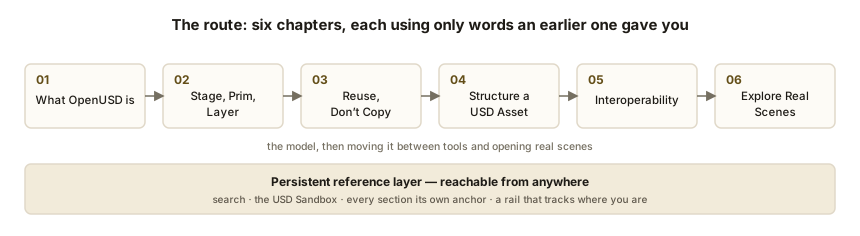
Six chapters in the order they actually make sense — each one only uses words
the last one gave you. Start at the beginning, or jump straight to a fact if you already know
what you are after.
Six chapters
Six chapters in one line: the four that build the model, then moving data between tools and opening real scenes.
—
This chapter is not written yet
Honest gap
The learning path is planned in full, but only some
chapters have been written. This one has not. Nothing is being hidden from you — there is
simply nothing here yet.
Chapter 1 (what OpenUSD is) and Chapter 2 (core concepts) are written, and the
installation guide is complete. Use the menu to reach them.
A standalone installation guide, separate from the chapters. At the end you will have compiled and launched your own OpenUSD authoring application from NVIDIA's Kit App Template.
This site is unofficial
Not affiliated with, endorsed by, or reviewed by NVIDIA. Everything here was written from the public repository and public documentation, both linked throughout.
Where sources disagree
This page says so rather than guessing. Anything we could not confirm carries a visible unverified marker — read those before you trust the number beside them.
110.2.0the Kit version this was verified against — changelog entry dated 2026-07-20
The repository moves
Roughly monthly. If a command here does not match what you see, the README is the authority, not this page.
Where the time actually goes: two of the four steps are downloads, which is why a restricted network is the single most common cause of a failed build.
01
What you are about to build
4 min
In brief
A desktop application of your own — viewport, stage tree, property panels, material tools, importers — carrying a name you chose, with source in a directory you control.
Can you do this right now?
~45 mintotal, most of it waiting on downloads and shader compilation
50 GBfree disk to plan for — an estimate, see the note below
1 GPUan RTX card with a current driver. No software fallback exists
0 accountsno NVIDIA login needed for any step here
The 50 GB figure is our own extrapolation, not NVIDIA's. Neither the README nor the companion tutorial states a disk requirement — both were checked. Treat it as a floor, not a specification.
How that estimate was reached. NVIDIA's NGC listings put the Kit SDK at roughly 1 GB compressed and the air-gapped bundle at roughly 5.7 GB compressed. Uncompressed, plus a build tree, plus shader, extension and packman caches, 50 GB is a safe working figure — but still a figure we made up.
No NVIDIA account or login is required for any step in this guide. This is an absence-of-evidence conclusion: no login step appears anywhere in the README or the template docs, and the clone is a public repository.
Three ideas that make sense of this
Kit is a framework
Renderer, UI toolkit, OpenUSD integration, extension loader. Not a program you launch — the thing programs are made of.
Everything is an extension
The viewport, the stage tree, the file menu. No monolithic core with plugins bolted on; only a loader and a great many extensions.
An app is a list
A .kit file is TOML naming the extensions to load and the settings to apply. That is close to the whole story.
There is no application binary to configure: the .kit list is the application, which is why adding a panel permanently means editing that file rather than clicking anything.
How this relates to USD Composer
The product USD Composer is a scene-authoring application NVIDIA shipped as part of its launcher-era product line.
The templatekit-app-template includes a template named USD Composer, described in the repo as a starting point for authoring complex OpenUSD scenes, aimed particularly at configurators (template README).
You are not downloading the product You are generating a new application of your own, with a Composer-like feature set and layout.
Deliberately reduced The template is an essential set of extensions, not a byte-identical clone of the retail app.
It is a foundation you extend, not a product you run.
The time budget, step by step
Cloneseconds
template new1–2 minutes answering prompts
First build10–30 minutes, mostly downloading
First launch5 to 8 minutes — shaders compile. Documented and expected, not a hang
Later launchestens of seconds
The 10 to 30 minute build range is our estimate, not NVIDIA's. NVIDIA documents the 5–8 minute shader figure but says nothing about build duration. Build time is dominated by download speed, so treat the range as a rough shape rather than a number. The 5–8 minute shader figure is documented, in two places.
One thing to know before you start
This is a feature branch The public kit-app-template repository tracks a feature branch of the Kit SDK — regularly updated, intended for prototyping and testing.
Production lives elsewhere For production work NVIDIA points to the Production Branch distributed through NGC, stated at the top of the README.
For learning, this is right Just do not be surprised when it changes under you.
02
Prerequisites
5 min
In brief
Each item has a test. Run the test; do not assume. Checking your driver now costs a minute — discovering it is too old after a thirty-minute build costs your evening.
An NVIDIA RTX GPUThe README requires an RTX-capable NVIDIA GPU and recommends RTX 3070 or better. Run nvidia-smi. If the command is not found, you have no NVIDIA driver. If it prints a table, read the GPU name from the header.
A recent enough driverMinimums are 550.54.15 on Linux and 551.78 on Windows. Read the Driver Version column of that same nvidia-smi output; update from nvidia.com/drivers if you are below it.
A supported OSWindows 10 or 11, or Linux (Ubuntu 22.04 or newer). On Linux run lsb_release -a. There is no macOS support and no path to it.
GitRun git --version. Install from git-scm.com if missing.
Disk spaceNo official figure exists. Plan for 50 GB free — our estimate, explained in section 01. The caches do not live in your project directory.
Internet accessThe build downloads the Kit SDK, the repo tooling, and every extension from NVIDIA-hosted registries. Neither optional nor small.
A writable NTFS or ext4 volumeThe tooling relies on junctions and symlinks. Run df -T on Linux, or check the drive's properties on Windows. exFAT will fail.
A short pathKeep the repo near the root of a drive — C:\kit\ is a good choice. A deep path under your user profile can blow the Windows path limit during build or package.
This is the answer to "why is my C: drive full when the project is on D:" — three of the four destinations are outside the directory you cloned into, and none of them is cleaned by repo build -c.
Two things you do not need
Do not install Python
The repository ships its own through packman — repo.sh execs tools/packman/python.sh. Your system Python is not used and its version does not matter. No virtualenv, no pip install step.
Do not install Git LFS
The 110.1.2 changelog entry records its removal from the prerequisites. Older guides and blog posts still tell you to install it. Ignore them.
The "no Python needed" point is our conclusion, not NVIDIA's sentence. The README never says it outright — but repo.sh demonstrably uses a packman-provided interpreter, and no Python appears in the prerequisites list. Confident, but inferred.
Build tools — only if you write C++
You do not need these for the USD Composer template as generated; its setup extension is Python. Add them only when you decide to write a C++ extension.
Windows
Visual Studio 2019 or 2022 with the Desktop development with C++ workload, plus the Windows SDK.
Linux
sudo apt-get install build-essential
Restricted networks. Behind a corporate proxy, a strict firewall, or aggressive endpoint protection, expect trouble at the build step. NVIDIA publishes an air-gapped SDK bundle on NGC for genuinely disconnected environments, but that is a different workflow from this guide.
03
Clone the repository
1 min
In brief
Step 1 of 8. A small clone — the tooling, the SDK, and the template packages all arrive later, on first use.
Clone the repository
Windows (PowerShell)
cd C:\
git clone https://github.com/NVIDIA-Omniverse/kit-app-template.git
cd kit-app-template
Linux
git clone https://github.com/NVIDIA-Omniverse/kit-app-template.git
cd kit-app-template
You should see: a clone of a few tens of megabytes. Listing the directory shows repo.bat, repo.sh, repo.toml, premake5.lua, templates/ and tools/. There is no source/ yet and no _build/.
Every command from here on runs from inside this directory.
04
Generate the application
6 min
In brief
Steps 2 to 5. repo is this repository's task runner — repo.bat on Windows, repo.sh on Linux. Same tool, same subcommands; the prefix is the only difference in every command below.
See what templates are available
Windows
.\repo.bat template list
Linux
./repo.sh template list
You should see: the first repo command you ever run bootstraps the tooling, downloading packman and the repo_* packages into _repo/. A minute or two of download progress. Subsequent commands start instantly.
Kit ServiceHeadless, no UI. For services built on Kit functionality.
Kit Base EditorThe minimal graphical app — loads, manipulates and renders USD through a GUI.
USD ComposerThe one you want. Scene authoring for complex USD, aimed at configurators.
USD ExplorerExploring and collaborating on large scenes. Review-oriented rather than authoring-oriented.
USD ViewerViewport only, built to be streamed to a web page.
The exact name is USD Composer
That is the display string you select in the wizard. Its internal template key is omni_usd_composer, rendering from apps/usd_composer/omni.usd_composer.kit — both visible in templates/sample_templates.toml.
Why the key matters
You will not type it in the wizard. You need it if you later script this with template replay.
Want something lighter?
Take Kit Base Editor instead. Everything here applies unchanged except that it has no setup extension prompt.
Run the wizard
Windows
.\repo.bat template new
Linux
./repo.sh template new
You should see: an interactive prompt sequence navigated with arrow keys and Enter.
Answer the prompts
What do you want to create? → Application
Which template? → USD Composer
Name of the application .kit file — namespaced, lowercase, alphanumeric. The template default is my_company.my_usd_composer. Use your own namespace: mystudio.composer. This becomes a real filename, so the naming rules are not decorative.
Application display name — free text, shown in the title bar. Default My USD Composer.
Version — semantic versioning recommended. Default 0.1.0.
Then, because USD Composer requires one, you are prompted for a setup extension. The wizard names it: omni_usd_composer_setup.
Extension name — default my_company.my_usd_composer_setup_extension. Match your namespace: mystudio.composer.setup.
Extension display name and version — as above.
You should see: the tool reporting the path it created. Defaults are fine everywhere if you are only testing.
Confirm the wizard did its job
The tool edits several things on your behalf:
source/apps/<your-app>.kit your application definition, now on disk
premake5.lua gains a define_app("<your-app>.kit") line so the build system finds it
repo.toml your app path is added to repo_precache_exts.apps
source/rendered_template_metadata.json records what was rendered — this is what makes template modify and template list work later
You should see: git status showing changes to premake5.lua and repo.toml, plus a new source/ directory.
The wizard's real work is the lower box. Two files are generated for you to edit; three more are amended so the build system can find them, and keeping those three in step is the wizard's job, not yours.
About the setup extension
This extension holds the application's layout, window arrangement, and extension configuration. It is generated as editable source in your project — the file you will edit first when you want to change how your app looks.
Application layers
You may also be asked whether to add application layers. Say No. Layers add optional capability — notably streaming to a browser — and you do not need them to run locally. You can add them later without regenerating anything:
Windows
.\repo.bat template modify
Linux
./repo.sh template modify
Scripting it (optional)
To make this reproducible in CI, record the answers and replay them:
Windows
.\repo.bat template new --generate-playback my_playback.toml
.\repo.bat template replay my_playback.toml
Linux
./repo.sh template new --generate-playback my_playback.toml
./repo.sh template replay my_playback.toml
The wizard prompts may not read exactly like this. The substance — app name, display name, version, then setup extension name, display name, version — is documented in the template README, but the exact wording and ordering came from documentation, not from a live run. Real wizards drift from their docs.
Two smaller caveats. The "add application layers" prompt is documented for Kit Base Editor and not shown in the USD Composer prompt list, so the flow may differ. And my_playback.toml is our substitution for NVIDIA's {playback_file_name}.toml placeholder.
05
Build
3 min + waiting
In brief
Step 6. Ten to thirty minutes, almost all of it network rather than CPU. You are downloading the Kit SDK and every extension your .kit file depends on.
Build the application
Windows
.\repo.bat build
Linux
./repo.sh build
You should see, verbatim, the success line the README documents:
BUILD (RELEASE) SUCCEEDED (Took XX.XX seconds)
And a _build/ directory that was not there before. It is large. It is also disposable — regenerated from source/, and correctly gitignored.
The flag worth remembering
./repo.sh build -c # clean the build directory first
Reach for -c whenever a build starts behaving oddly after you have hand-edited configuration. It is the first thing to try and it costs nothing but time.
What actually gets built
Everything in source/ Build does not select just your app.
Every template new adds to that Another app lands in source/ and joins the build.
Fine for experimenting Once a project is real, the repo's own guidance is to split projects apart so you are not rebuilding four applications to test one.
06
First launch
4 min + waiting
In brief
Steps 7 and 8. The first run takes 5 to 8 minutes while shaders compile. NVIDIA states this twice in its own docs because everyone assumes it has hung. It has not. Leave it alone.
Launch
Windows
.\repo.bat launch
Linux
./repo.sh launch
You should see: a prompt to pick which .kit file to run. Choose your Composer app.
Wait out the shader compilation
A window may appear early and sit there looking frozen. Go make coffee. Subsequent launches take seconds, because the compiled shaders are cached. If you kill it during compilation you will simply pay the same cost again next time.
You should see, after 5 to 8 minutes: a full authoring environment — viewport in the centre, stage tree listing the prims, a property panel for the selected prim, a content browser, menus across the top. The title bar shows the display name you chose.
That description of the launched window is inferred, not observed — nobody on this site has run the build. It is drawn from what a USD authoring application contains and from screenshots referenced in NVIDIA's READMEs that we did not view. Plausible; unconfirmed. This is the one gap a real screenshot would close.
Do one real thing
Reading a viewport does not make it feel like yours. Try these two, straight from the template's own README.
Window → Browsers → Configurator Samples
Opens a browser of configurator sample content. Load one, orbit around it, select something in the stage tree, change a value in the property panel. Now you have driven the thing you built.
Developer → Extensions
The Extension Manager. Every entry is a component; toggling one on loads it into the running application immediately, no restart. Turn something on and watch a new panel appear.
Both menu paths are documented in the template README but untested by us. Menu paths are exactly the kind of thing that drifts between Kit releases — if yours differ, trust the running app.
The detail that catches everyone
The manager writes to memory, the .kit file writes to disk — which is the entire difference between trying an extension and shipping one.
Enabling an extension in the manager is temporary. It lasts for this session only. To make it a permanent part of your application, add it to the [dependencies] section of your .kit file and rebuild. Adding the layer view, for example, means adding omni.kit.widget.layers:
[dependencies]
"omni.kit.widget.layers" = {}
The Extension Manager is where you shop. The .kit file is where you commit. Browse, try, then write it into the .kit file and rebuild — that loop is the core development cycle for a Kit application.
07
Where the interesting files are
3 min
In brief
Two directories you own, two the tooling owns. Editing the wrong ones wastes an afternoon.
Files you edit
source/apps/<your-app>.kit the most important file in the project. TOML. Its [dependencies] table is the extension list that defines your application; the rest is settings.
source/extensions/<your-setup-extension>/ layout, window arrangement, startup configuration. Changing how the app looks starts here.
premake5.lua build configuration, one define_app() call per application. template new maintains it.
repo.toml tooling configuration, including repo_precache_exts.apps and the package name used by repo package.
tools/VERSION.md the version stamped on packages by repo package. Deliberately separate from any .kit version — a package can contain several apps.
Directories the tooling owns
Do not edit. Do not commit.
_build/ build output. The runnable application sits at roughly _build/{platform}/{config}/. Disposable.
_repo/ downloaded tooling packages and, since 110.1.0, the template packages themselves. Disposable.
Anything else beginning with _.gitignore excludes _*/ wholesale.
If you are unsure whether to edit a file, check which side of this diagram it is on — the tooling will silently overwrite anything on the right the next time you build.
One structural change worth knowing about
As of the 110.1.0 release, templates are no longer plain files inside the repository. They are versioned packages (kit_core_templates, kit_sample_templates) declared in tools/deps/repo-deps.packman.xml and resolved into _repo/deps/. Both are currently pinned to 110.2.0+feature.11994.96415c1d.gl.
Your directory stays clean It contains only your own code and configuration. Template boilerplate stays out of it.
templates/ is a reference copy The directory still visible at the repo root is not what the wizard reads. The wizard reads from _repo/deps/.
Old tutorials are wrong here Anything telling you to edit files under templates/ to change what gets generated describes a model that no longer applies.
The template keys and defaults quoted throughout this guide were read from the in-repo templates/ copies, because packman package contents cannot be fetched over plain HTTP. They should be identical to the packaged copies, but we could not verify that. If the packaged templates have drifted, the keys and defaults could differ. Low risk, non-zero.
08
Troubleshooting
6 min
In brief
Twelve symptoms, ordered roughly by how often people hit them. Scan the headings, open only yours. Most are documented failure modes rather than folklore — the sources are in the Markdown version of this guide.
The app seems to hang on first launch
Cause: it is compiling shaders. Documented behaviour.
Fix: wait 5 to 8 minutes. Do not kill it — you will only pay the cost again. If it is still unresponsive after fifteen minutes, then start suspecting the driver.
Build fails, or the app builds but does not appear in the launch list
Cause: a desynchronisation between the three places an application must be registered. NVIDIA's troubleshooting doc is explicit that a build is determined by:
the apps array under [[repo_precache_exts]] in repo.toml
the define_app() calls in premake5.lua
the .kit files actually present in source/apps/
Fix: all three must list the same .kit files. template new keeps them in sync; hand-editing breaks them. Open all three, compare, fix, then rebuild clean.
./repo.sh build -c
Build fails on Windows with path or file-not-found errors
Cause: Windows path length.
Fix: move the repository closer to the drive root — C:\kit\kit-app-template rather than something nested under your user profile — and rebuild clean. A documented recommendation, not folklore.
Build fails with symlink or junction errors
Cause: you are on an exFAT volume. The tooling requires a filesystem supporting junctions and symlinks.
Fix: move to NTFS or ext4. Common when working from an external or removable drive.
Stale, wrong, or missing dependencies
Fix, first pass: clear the application's own caches at launch time. The -- separator matters: everything after it is passed straight through to Kit rather than consumed by repo.
Fix, last resort. There are global caches outside your project. Clearing these forces a full rebuild of everything on your machine.
Extension and application dataWindows %LOCALAPPDATA%\ov · Linux $HOME/.local/share/ov
packman packagesWindows %PM_PACKAGES_ROOT%, defaulting to {drive}\packman-repo · Linux $PM_PACKAGES_ROOT, defaulting to $HOME/.cache/packman
uvWindows %LOCALAPPDATA%\uv\cache · Linux $HOME/.cache/uv
This table is also the answer to "why is my C: drive full when the project is on D:" — the caches do not live with your project.
The application crashes at startup, or the renderer will not initialise
Cause: your driver version, in the great majority of cases.
Fix: check it against the minimums — 550.54.15 Linux, 551.78 Windows. On Linux, also confirm you are on the NVIDIA proprietary driver and not Nouveau, and that you are not running inside a remote session with no GPU access.
A custom extension will not import, or breaks other extensions
Cause: a top-level namespace colliding with a Python standard library module — random, sys, xml and friends. Kit may try to load extensions out of those modules and the resulting failures are baffling.
Fix: namespace properly — mystudio.composer.myfeature, not random.myfeature.
An extension I enabled disappeared after restart
Cause: working as designed. The Extension Manager enables things for the current session only.
Fix: persist it by adding the extension to [dependencies] in your .kit file and rebuilding.
./repo.sh: Permission denied on Linux
Fix:
chmod +x repo.sh
If you cloned on Windows and copied the tree to Linux you may also have CRLF line endings, producing a bad interpreter error; dos2unix repo.sh fixes that.
Not documented in the repo. Inferred from general practice with shell-script entry points, not from any NVIDIA source.
Downloads fail or hang at the build step
Cause: a corporate proxy, firewall, or endpoint protection interfering with packman's downloads from NVIDIA's registries.
Fix: try from an unrestricted network to confirm the diagnosis. For genuinely air-gapped environments NVIDIA publishes an air-gapped SDK bundle on NGC, but that is a separate workflow.
The cause is inferred from the symptom, not documented. The air-gap bundle is real.
launch --package no longer works the way a tutorial said
Cause: it is deprecated as of 110.1.2 and slated for removal.
Fix: decompress the package archive and run the extracted application's .bat or .sh directly. When running from an extracted package the repo tool is not available — pass arguments straight to the script:
Cause: only relevant if you have been using repo package_container.
Fix: check with docker system df, then docker container prune for routine cleanup. docker system prune is far more aggressive — read what it intends to delete before agreeing.
09
Where to go next
2 min
In brief
You have a running application. The next moves are packaging it, testing it, streaming it, and reading the two documents that will answer most of your future questions.
Ship what you built
.\repo.bat package
./repo.sh package
Name it explicitly with -n / --name. Or produce a thin package — only your custom extensions plus the configuration to pull the rest from a registry — with --thin. The version comes from tools/VERSION.md, not your .kit file.
Test it
./repo.sh test
Each application template ships a starter test suite. Build first — testing runs against the build directory.
Stream it to a browser
Add a streaming layer with template modify, then pair it with the web-viewer-sample. Launch with -- --no-window so the desktop window does not fight the streaming client.
Discover the tooling
./repo.sh -h
./repo.sh template -h
Every command self-documents.
The choice is where the download happens: once, when you build the archive, or on every machine the first time it runs.
CHANGELOG read before upgrading; where breaking changes are announced
When you next pull this repository, read the changelog first. The 110.1.0 entry silently relocated where templates live. The 110.1.2 entry dropped a prerequisite and deprecated a flag. Those are the changes that make an old tutorial — including this one — quietly wrong.
Two halves. A way to write down what is in a 3D scene, and a set of rules for merging many of those written-down scenes into one.
OpenUSD is a description of a 3D scene, and a recipe for assembling that description out of many separate files — without editing any of them.
the one sentence to keep
Half one — the description
A USD file on disk records what objects exist, where they sit, what they are made of, and how they change over time.
Half two — the merge
One USD file can point at others. Open it and you get everything they collectively say, assembled on the fly. The originals stay untouched.
.usdathe text flavour — readable in any editor
.usdcthe binary flavour — same content, faster to load
.usdeither one; the file decides
Where it came from
Short for Universal Scene Description. Pixar built it for its own films and open-sourced it in 2016. The code is C++ with Python bindings, and Python is where nearly everyone starts.
The arrows run one way only. Composition reads the four files and builds the stage; there is no return path, which is why an override never damages the thing it overrides.
The two ideas underneath
One — it describes, it does not draw
A USD file is a list of statements. A mesh with these points and faces. A transform positioned here. A material whose roughness is 0.4.
What it never holds is pixels. A path tracer, a game engine and a physics simulator can all read the same file, each interpreting it its own way. USD describes the scene and draws none of it.
Two — many files, one scene
A USD file can point at other USD files. Opening it gives you the combined result, and none of the sources were modified to make that happen. That merging is composition.
Two words carry it. A layer is one USD file. A stage is the merged scene composition builds from a layer and everything it points at. You open a layer; you work with a stage, and a stage is never a file on disk.
Questions people have right here
Is OpenUSD a file format, or something bigger?
Partly a format. .usda, .usdc, .usd and .usdz are real files on disk. But most of what OpenUSD is sits above them: the composition rules for merging many files into one scene, and a C++ and Python API for reading and authoring it.
A file format you could copy in a weekend. The composition rules are the part everybody actually adopted.
If a stage is not a file, what is it?
It is the result of opening one layer and following everything that layer points at, assembled in memory. When you save, you write layers back out — never “the stage”, because there is no such file.
Two people can open the same layer with different overrides loaded and get two different stages from identical files on disk.
Can I just double-click a .usd file and see it?
Usually not. You need something that speaks USD: usdview (chapter 7), or Blender, Houdini, Maya, or an Omniverse application.
The one exception most people meet is .usdz on macOS and iOS, which Quick Look previews without any extra software.
The second half — the merging — is what separates USD from every 3D format you have used before.
02
The problem it solves
3 min
In brief
Before USD, a scene lived inside whichever application built it. Moving it meant exporting a copy — and copies go stale the moment someone edits the original.
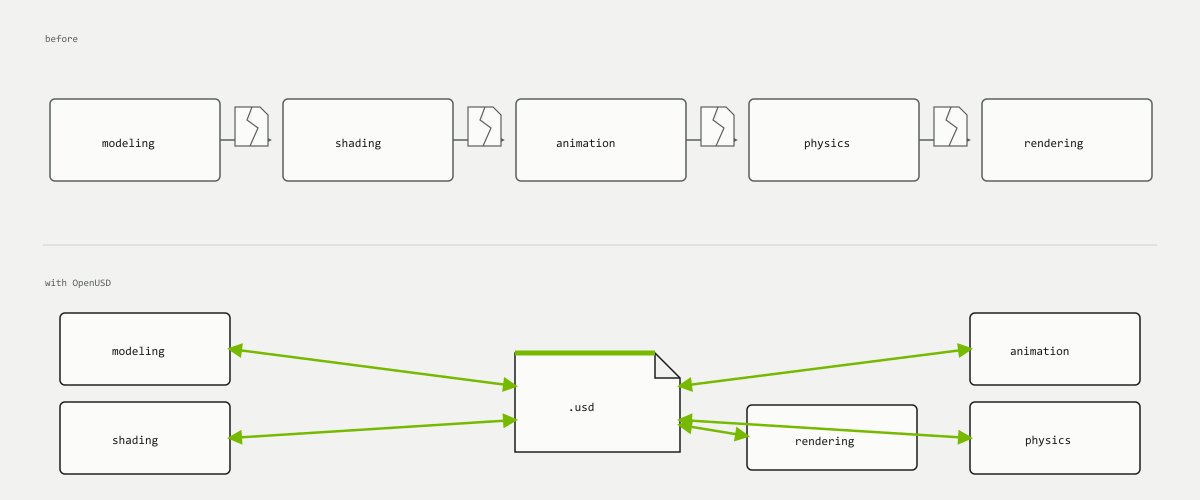
One car, five tools
Export from tool to tool
Body modelled here, materials authored there, animation in a third tool.
Every hop is an export then an import.
Each hop drops whatever the target cannot express.
Change the body two weeks later and every downstream copy is wrong.
Everyone reads the same files
Each tool reads and writes shared USD files.
A file can point at another, so the original stays the source of truth.
An edit is a separate, removable statement over someone else's data.
Fix the body once and every consumer sees the fix.
Without OpenUSD, each tool exports to the next and loses something; with it, every tool reads and writes the same .usd in the middle.
Robotics hits the same wall
The robot's structure is one file, its sensors another, the warehouse comes from CAD, the props from a library. Testing one robot in twenty environments should not need twenty conversions.
Why not FBX or glTF?
Those are delivery formats: flatten one finished scene into one file, hand it to a runtime. See glTF for the clearest example.
A delivery format answers how do I ship this scene.
USD answers how do we keep building it, across teams and tools, for the next eighteen months.
But couldn’t you just…
… use FBX, OBJ or glTF instead?
Those answer a different question: how do I ship this scene. They are good at handing a finished result to somebody else.
What they cannot do is let five people change different parts of one scene at the same time without somebody overwriting somebody else. Chapter 5 measures exactly what each format carries and what it drops.
… just agree on one tool and avoid the problem?
Teams try. It holds until the first specialist arrives — the person whose simulation tool or CAD package is the only one that does their job.
It also assumes the tool you standardise on today is still the right one in three years, which is the assumption that created this problem in the first place.
Does OpenUSD replace my modelling tool?
No. You still model in Blender, Maya or Houdini. USD is what those tools write out and read back so their work can stand in one scene together.
It is the meeting place, not another seat at the table.
The problem is not moving a scene once. It is keeping one scene alive while many people change it.
03
USD, OpenUSD, AOUSD, Omniverse
2 min
In brief
You will meet all four names in your first week. They are related, and they are not interchangeable.
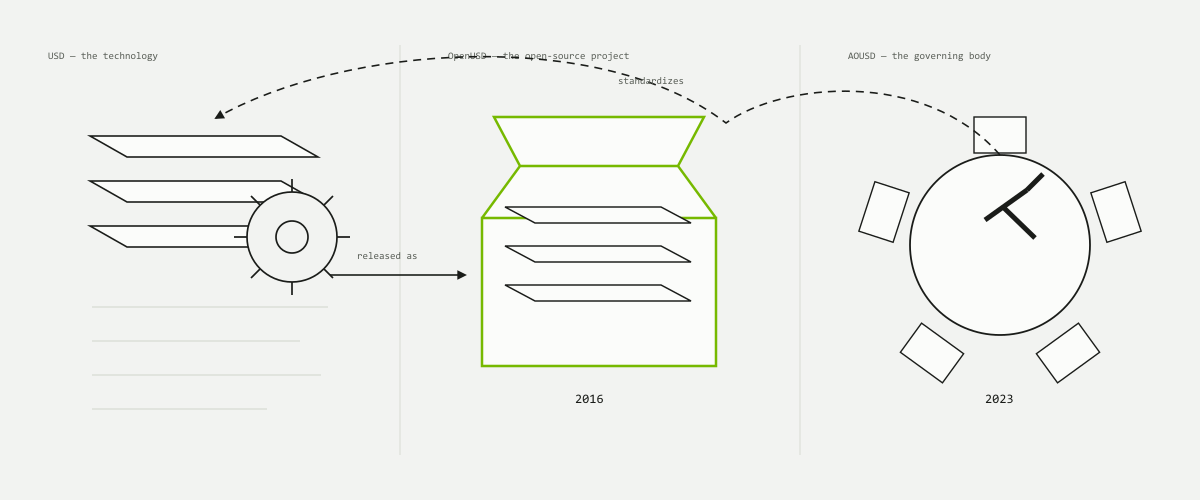
USD — the technology
The data model and the composition rules. Pixar's, originally built for their own films.
OpenUSD — the project
The open-source project and reference implementation: the code you install, the repository you file issues against. Both names get used for the same thing; OpenUSD is the one the industry now prefers, and the one this site uses.
AOUSD — the standards body
The Alliance for OpenUSD, formed in 2023 under the Linux Foundation's Joint Development Foundation by Pixar, Adobe, Apple, Autodesk and NVIDIA. It ships no software; it writes the specification down so independent implementations agree.
Omniverse — one platform on top
NVIDIA's applications and SDKs built on OpenUSD. If you are using Omniverse you are using USD; the reverse does not hold.
USD is the technology, OpenUSD is the open-source project it was released as in 2016, and AOUSD is the body that has standardised it since 2023.
Questions about the four names
Are “USD” and “OpenUSD” the same thing?
In practice, yes — people use them interchangeably and nothing is lost.
Strictly: USD is the technology Pixar built for its own films; OpenUSD is the name it carries as an open-source project, released in 2016. If you see both words in one document, no distinction is being drawn.
Do I need Omniverse to use OpenUSD?
No. This is the single most useful thing on this page. OpenUSD is free, open source, and runs with no NVIDIA software anywhere near it.
Omniverse is one set of applications built on top of it. Chapter 0 walks through building one if you want it; nothing else in this book needs it.
What does AOUSD actually do?
The Alliance for OpenUSD, formed in 2023, standardises the specification so the format does not fork into a different dialect per vendor.
You will never interact with it directly. You notice it when a question about how something should behave has one answer instead of four.
USD ≠ Omniverse. That is the most useful distinction here, because most documentation on the web mixes the two freely.
04
Who uses it, and for what
2 min
In brief
Four industries, four reasons, one underlying need: many contributors, many tools, one scene.
Film and visual effects
The original home. A shot is assembled from hundreds of assets touched by modelling, rigging, animation, lighting and effects at once. Referencing beats copying when a hero asset changes late.
Robotics and simulation
A robot's links, joints, sensors and physical properties live in the scene as ordinary USD data. One robot drops into many test environments; one environment hosts many robots. NVIDIA's Isaac Sim uses USD as its native scene format.
Industrial digital twins
A digital twin is a live 3D model of a real facility, such as a factory. It pulls geometry from a dozen vendor CAD tools and must stay current as the real thing changes: a referencing problem, not an export problem.
Architecture and construction
A building is authored by separate structural, mechanical and interior teams. Each owns its own files; the coordinated model is the merge of all of them, not a copy anyone has to maintain.
Games — pipeline, not runtime
Mostly the interchange spine between content tools and the engine. Unreal has first-class USD import. Studios still ship a runtime format to players, so USD is what the pipeline runs on, not what the player downloads.
USDZa zipped single-file flavour of USD, used by Apple platforms to hand an AR object to a phone
Read it across rather than down: four industries that share nothing else share the middle bar, and that shared row is the whole reason USD spread beyond film.
Unity has shipped USD packages at various times, but they have been through deprecation and revival cycles. Check the current state yourself before planning around it.
Is this for me?
Do I have to work in film for this to be worth learning?
No. The four industries above share exactly one thing: too many contributors and too many tools for one file to own the scene.
That shape turns up in a two-person team as readily as a two-hundred-person one. It just takes longer to start hurting.
Is this overkill if I work alone?
Sometimes, honestly. If you build one scene in one tool and never hand it on, that tool's own file is simpler and you should use it.
USD starts paying the moment a second tool, a second person or a second version arrives — and the version of you six months from now is a second person.
Different industries, same shape of problem: too many contributors and too many tools for any one file to own the scene.
05
Try it yourself
3 min
In brief
Everything above is a claim about a text file. Here is the text file, live: press a button, and read what changes.
There is no USD application you launch to build a scene — you author USD from Python or C++, or through an application that speaks it, such as Houdini, Maya, Blender or the Omniverse apps. What follows stands in for that: the same authoring, reduced to five buttons.
Watch the listing rather than the picture. Every button writes a statement — a prim, a transform, a colour — and the view on the right is only ever a reading of those statements. Nothing you press draws anything; it says something, and something else draws it.
Before you go on
So what do I actually install?
Nothing, to read this book. To open real files, usdview — chapter 7. To author from code, the OpenUSD Python libraries.
To work in something you already know: Blender, Houdini and Maya all read and write USD today.
Is .usda the same as .usd?
The same data in a different encoding. .usda is human-readable text — it is what the panel above is showing you. .usdc is the binary form: far smaller, far faster to load, unreadable in an editor.
.usd is either one; the file's own contents decide. You can convert between them without losing anything.
Do I need to learn Python to use OpenUSD?
Not to start. Everything in the next few chapters is readable as text and doable in an application.
Python is how you automate it once you know what you want to automate, which is not yet.
This is the core idea: OpenUSD describes a scene, and tools can read, compose, and display it.
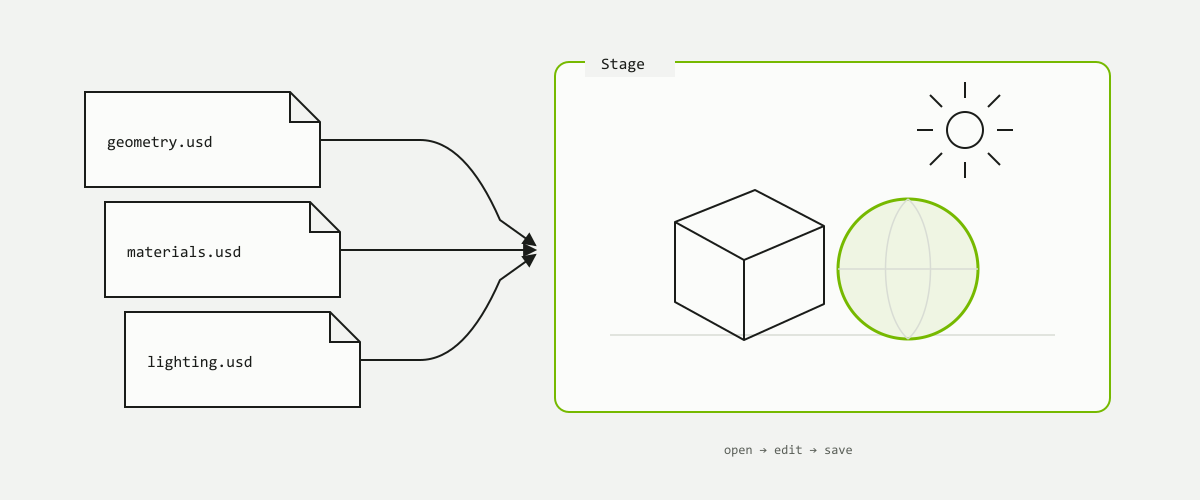
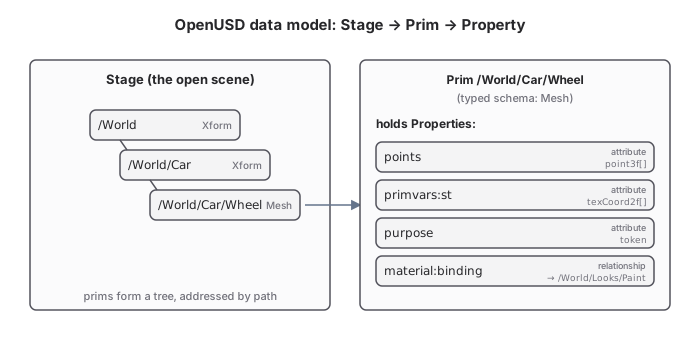
The stage is your scene as a whole — the thing you open,
edit and save. It is the live document that holds every object and resolves all the USD files
behind it into one coherent scene.
Five words carry this chapter: stage, prim, attribute, layer and
composition. Three of them nest inside each other — a stage holds prims, a prim holds
attributes. The other two say where all of that came from. Every other term in OpenUSD
is detail hanging off one of the five, so learn them in this order and the rest of the
vocabulary stops looking like a glossary and starts looking like a map.
Three separate USD files go in; one live scene comes out — that scene is the stage.
A stage is not a file.
the thing beginners trip on
What you actually opened
You open scene.usda. What you get back is the complete scene built from that
file and everything it pulls in. The file is one input; the stage is the result.
1stage in memory, built from any number of files on disk
Python — open, reach, walk, save
stage = Usd.Stage.Open("scene.usda")
ball  = stage.GetPrimAtPath("/World/Ball")

for prim in stage.Traverse():
    print(prim.GetPath())

stage.GetRootLayer().Save()
Four capabilities cover almost everything
Usd.Stage.Open
opens a file and builds the whole scene from it
GetPrimAtPath
reaches one object by its address
Traverse()
walks every object in the scene, top down
GetEditTarget
chooses which file receives what you author next
A stage is the complete scene, opened — the result of combining files, never a file itself.
02
Prim
3 min
In brief
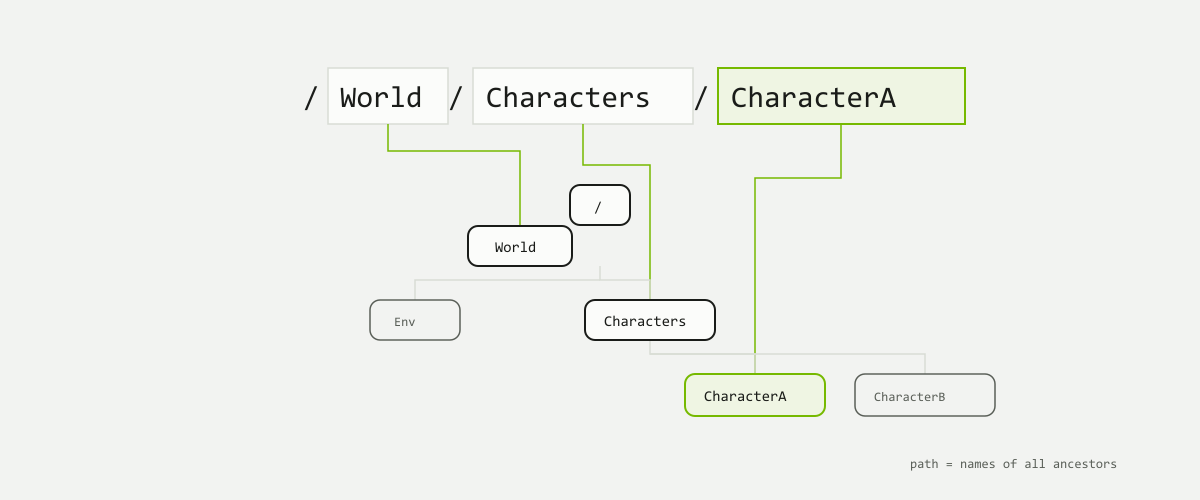
A prim is one object in the scene — a mesh, a light, a
camera, or a group holding others. Prims form a tree, and each has a unique path naming
all its ancestors.
"Prim" is short for primitive, and it is the basic object of the USD world. If you can select
it, hide it, move it or point at it, it is a prim. A scene is nothing but prims arranged in a
tree, and the tree is what gives every one of them an address.
Every slash-separated piece of the path is one step down the tree — the string and the hierarchy are the same thing.The rename touched one node, but the addresses of everything below it changed with it — and there is no redirect from the old path to the new one.
The path is the address and the identity.
there is no separate ID
/World/Car/Wheelthree names, three steps down the tree
What follows from that
Paths are absolute they always start at / and read top to bottom.
Names must be unique among siblings the full path is then unique across the stage.
Rename an ancestor and every descendant's path changes with it.
Nothing tracks the old path which is why asset structure gets its own chapter later.
Each prim also carries a type saying what it is — Xform for a group that
moves, Mesh for geometry, Cube for a box — and schemas can bolt extra
bundles of properties onto it; neither needs unpacking today.
A prim is one object in the scene, and its path is both where it sits and who it is.
03
Attribute
2 min
In brief
An attribute is a named value carried on a prim. Where
the prim is which object, its attributes are everything measurable about it — where it
sits, what colour it is, how big it is.
Open one prim up and you find its attributes: a name, a value type, and a value.
Where position lives
xformOp:translate is an attribute. Move an object in a viewport and this is
the number that changed — nothing else about the prim is touched.
Where colour lives
primvars:displayColor is an attribute too. So is a sphere's
radius, and a camera's focal length. Same mechanism every time.
name · type · valueevery attribute is exactly these three things
Attributes hold values; a few properties hold links
Most of what a prim carries is an attribute. A handful are relationships —
pointers at other prims, such as which material a mesh uses.
Attribute values are bare numbers with no unit attached, so a scene
records its own real-world scale in metersPerUnit — which is why an asset authored
in centimetres can arrive in a metres scene a hundred times too small.
If you are looking for position, colour or size, you are looking for an attribute.
04
Layer
3 min
In brief
A layer is one USD file — a container of statements
about a scene, not the scene itself. Each statement is an opinion:
"/World/Ball's radius is 2." A file full of opinions is all a layer ever is.
This is the idea that makes everything after it work. A .usda file on disk does
not own the scene — it contributes to it. Someone else's file can contribute to the
same scene at the same time, and the object you see is what falls out of reading all of them
together. That is why USD is not one dead file you take turns editing.
No file here contains the finished ball. Each holds a few statements about it, and the ball is what those statements add up to.
A layer is a file of opinions. A stage is what you get when layers are combined.
the sentence to carry forward
Two people, one scene
Because opinions live in separate files, two people can work on the same scene at once
without either of them holding the other's file hostage.
An edit does not destroy what it overrides
Restating a value in your own layer leaves the original statement untouched in its own
file. Remove your layer and the earlier value is simply there again.
opinionone statement, in one layer, about one value
A layer is a file of opinions — never the scene, only a contribution to it.
05
Composition
2 min
Authored to fill a gapNVIDIA's docs assume composition everywhere and teach it nowhere.
This section is written for this site, not sourced.
In brief
Composition is the word for what just happened:
several layers combining into one stage. That is the whole idea, and for now it is all you
need.
Composition is the arrow in the middle — the step that turns a pile of files into a single scene you can select things in.
Why it exists at all
Splitting a scene across files only helps if something puts them back together. That
something is composition, and it runs every time a stage is opened.
When two layers disagree
One of them wins, whole. Values are never averaged, and the losing statement stays in its
file untouched. Which one wins is chapter 3's subject.
many → oneany number of layers, exactly one composed scene
Several layers compose into one stage — that is composition, and the rest is detail.
06
Mini tutorial
4 min
In brief
Five nouns, one small cube. Everything below is the chapter's
vocabulary made clickable: a prim you can move, an attribute you can change, and the
.usda text keeping pace with you.
The scene is two prims deep — an Xform called World with a
Cube called Box inside it — and the cube carries the two attributes
you have just met, xformOp:translate and primvars:displayColor. Nudge
the cube with the −X/+X and −Z/+Z buttons or drag it directly, recolour it, and type a new name
into the Name field. Reset puts everything back, so nothing you do here can go wrong.
Watch which line of text moves each time. Dragging the cube rewrites one attribute value and
leaves the rest of the prim alone. Renaming rewrites the prim's path instead — and if this were
a real scene with other files pointing at /World/Box, that is the moment those
references would stop finding it.
A USD scene is not just a file. It is a structured scene made of prims, attributes, layers, and composition.
Every mechanism in this chapter exists to say the same thing once and use it in many places. Copying is easier on the day you do it and worse on every day after.
The arrows point the same way in both halves. What changes is how many places a correction has to be entered, and therefore how many places it can be forgotten.
Reuse is not a file-size optimisation. It is the thing that lets one fix reach every place the asset is used, without anyone hunting for copies.
why this chapter exists
Centralised editing
One canonical description, edited once. The alternative is the same change made by hand in forty scenes, thirty-nine of them correctly.
Catalogues and libraries
Reuse enforces that an object is the library's version of that object, rather than a drifting descendant of it.
Broadcasting changes
A change at the source propagates to every consumer on their next load. Nobody is sent a mail asking them to re-import.
Shared memory and traversal
De-duplicated transforms, geometry, materials and textures cost less RAM and VRAM. Shared scene-graph data makes loading and render translation faster.
Two words you will keep meeting
AssetAn encapsulated OpenUSD structure whose root prim has a kind of component or assembly. Named, versioned, structured, and expected to persist.
Session artifactScene description generated for one process or session, with no expectation of reuse. Not everything USD describes is an asset.
These concepts feel familiar from other systems, and that is the trap. In OpenUSD a "reference" and an "override" have specific behaviours that do not match the words as most DCC applications use them.
Modularity and content reuse are the defining benefits of OpenUSD. Everything else in this chapter is machinery for delivering them.
02
Reference: use the same asset without duplicating it
5 min
In brief
A reference composes one prim and everything under it onto another prim. It is the workhorse arc — the only one that works both within a stage and across files.
The two dashed subtrees on the right exist on the stage but in no file on the right-hand side. Deleting scene.usd costs you the override; deleting chair.usd costs you the chair.
External references pull a prim hierarchy from another layer into this one.
Internal references pull from a prim elsewhere in the same stage — the target is a prim path with no layer.
One arc covers both cases. That is why a reference is the first thing to reach for.
The source is never modified. Overrides you author sit on top of what the reference brought in.
A short prim stands in for the whole chair. The geometry, the materials and the names beneath Chair_1 all arrive from chair.usd when the stage composes, and are stored in this file nowhere.
Building a scene out of assets
Read downwards it is a bill of materials; read upwards it is the build order. The multiplication only happens on the stage — on disk each tier stays one file.
A part is a component asset with its own USD file.
A rack references the same part many times.
A workcell references racks, fences and storage.
A facility references workcells — and is itself referenceable.
Nothing in that pyramid is a copy. Each tier is one file naming the tier below it, so a correction to part.usd arrives in all thirty-six places on the next load. Build it bottom up and the scene assembles itself.
Composition encapsulation
The boundary is drawn at the prim that introduces the arc, not at the file. That is why a referenced asset behaves the same in every scene that pulls it in.
References do not stay live
A reference arc only evaluates in the local layer stack of the prim that introduces it. Once composed it does not keep watching its target and does not update when something later authors opinions there.
bakesa reference is resolved once, when the stage composes
"Not live" is a feature, not a limitation. Encapsulation is what makes a referenced asset predictable: what you composed is what you get, regardless of what the rest of the stage does afterwards.
Reach for a reference first. A scene of a thousand chairs is one chair file and a thousand short prims.
03
Override: change one copy without damaging the source
4 min
In brief
A reference gives you the asset as its author made it. An override is how you restate one value of it in your own layer — one line, in your file, leaving the asset's file exactly as it was.
This is the half of non-destructive editing that a reference alone does not give you. You referenced a robot into a facility and this one needs to be yellow. You do not open the robot's file, and you do not copy the robot. You author one opinion about its colour in the facility layer, and the composed stage answers with yellow.
The override is one line long, so a later change to the robot's geometry still arrives. Copy the whole prim instead and every one of those four arrows is severed.
Where you already author the reference, the local edit can sit in the same block. The two forms compose to the same thing.
over and def
defDefines a prim. It says this object exists, and everything in the block describes it. A def with no reference is an object authored here out of nothing.
overOverrides a prim something else defined. It says nothing about whether the object exists — only what to change if it does. An over that matches nothing composes to nothing.
That difference is why a facility layer can be full of over blocks and still be tiny. It carries the corrections and none of the content.
Why the local opinion wins
Opinions are ranked, and a value authored directly on a prim outranks anything a reference brought in. The reference is a weaker source for the same value, so it fills in wherever you said nothing and steps aside wherever you said something. Nothing is deleted to make that happen — the referenced opinion is still in chair.usd, still correct, and still the answer for every other scene composing it.
The source file is never written to. Composition only ever reads it. Delete your override and the asset's own colour is back, because it never left.
Edit the source
Open the robot's USD, change its material colour, save. Every USD referencing that robot picks the change up — unless it overrides that value itself.
Edit the aggregate
Change the material colour on one referenced robot inside the facility. The robot's source USD is untouched; only this aggregate says otherwise.
Sparse override
Author only the one value you are changing. Everything else keeps coming from the weaker layer — geometry intact, one colour different.
Keep overrides sparse. Restate the one value you meant to change, not the whole prim — a fat override quietly freezes everything it repeats, and the next fix at the source stops arriving.
A reference lets you reuse an asset; an override lets you adjust it locally without changing the original.
04
Payload: keep heavy assets unloaded until needed
3 min
In brief
A payload behaves like an external reference with one addition: it can be left unloaded. That single difference is what makes very large scenes openable.
The prim, its kind and its metadata are all still there — which is why an interface has to advertise what the payload holds.Load state is a runtime decision, not a file edit. The same stage can be opened unloaded, worked in loaded, and closed without either choice being persisted into the scene description.
Reference
Composes when the stage composes.
You always pay for the contents.
Right for things you always need.
Payload
Composes only when loaded.
Load and unload during a working session.
Right for heavy contents you sometimes need.
Where to put one
At the component level is the common convention — payload the contents of a model, not every prim inside it.
Prefer a single level of payloads in a hierarchy. Some tooling and some OpenUSD APIs are designed around that presumption.
Payloads complicate descendant discovery — anything unloaded cannot be found by traversal, because it is not composed.
Use relationships to advertise contents so a consumer can learn that a payload contains, say, practical lights without loading it first.
A payload's saving is only real if consumers actually leave it unloaded. A pipeline that loads everything on open has paid the complexity and kept none of the benefit.
References are about structure. Payloads are about when you pay for it.
05
Mini tutorial
4 min
In brief
Two asset files and a scene that uses them. Everything below is this chapter made clickable: prims that reference, overrides that place them, and the .usda text keeping pace with you.
Three files sit in the tree on the left. car_body.usd and wheel.usd are the assets; shot.usda is the only one being edited. Inside it an Xform called Car holds a Body prim referencing @car_body.usd@ and a handful of Wheel_* prims, each referencing @wheel.usd@ and each carrying its own xformOp:translate. Add Wheel adds another referenced wheel, Move Wheel changes the transform of the selected one, and Reset puts the scene back.
Watch which file the text changes in. Every wheel you add and every wheel you move rewrites shot.usda and only shot.usda. wheel.usd on disk never changes — one wheel is described once, and four wheels are four short prims saying where that one wheel goes.
Reference the asset, override the placement, and the source of truth stays exactly one file deep.
Everything so far has been about getting USD to describe what you want. This chapter is about describing it to somebody else — another person, another tool, another team, six months from now.
Nothing about the two structures need differ on day one. What differs is who is standing on the far side of the dashed line when you want to change it.
A scene that only you can read is a scene that only you can use. It will still open and it will still render, and the moment somebody else needs to reference one part of it, swap one material, or hand it to a renderer you have never installed, the work of finding anything inside it lands on them.
That is the whole reason USD exists. Not to hold a picture, but to hold a description that survives being passed on. Structure is written for the person downstream, not for the person authoring it — and where OpenUSD is only an intermediate stage on the way to a final image you have wide freedom, while where the asset is the deliverable, the needs of whoever builds on it partly dictate its shape.
The next person
Opens your file without the context you had. Everything they can find quickly is structure you provided; everything else is time they spend guessing.
The next tool
Traverses rather than looks. A renderer, a validator or an importer wants to know where the models are without walking every prim to find out.
The next version
Your own asset, three months on. Structure is what lets you rebuild the inside of it without asking every consumer to change something.
The coding analogy holds well. An open-source library organises around long-term stability; a user-facing application organises around rapid change. Both are correct for their reader, and neither is correct for the other one's.
A good USD asset is not only visible. It is readable, reusable, and safe to change.
02
Four questions before you build
3 min
In brief
There is no best way to structure an asset, the same way there is no best way to organise code. There are four plain questions, and honest answers to them get you most of the way.
What is the main object?
Name the one thing this asset is. A chair, a robot, a whole apartment building. If you cannot say it in a few words, this is probably two assets that have not been separated yet.
What parts does it contain?
List what lives inside it, and at what grain. A robot has arms and a base; whether the bolts are parts of their own is a decision, not a fact. Parts nobody will ever address separately do not need to be separate.
Which parts may change later?
Colour, level of detail, an open door and a closed one. A part with more than one acceptable state is a candidate for a switch the asset carries with it, rather than for a second file.
Who will use this asset next?
A colleague in the same tool, a renderer in a farm, a customer building their own scene on top of yours. That answer decides which names you are still allowed to change later and which you are not.
Asset structures are never finished, only abandoned.
the epigraph of NVIDIA's own guide
Answer them out loud before you open a file. The four answers are cheap to change while they are still sentences, and expensive to change once they are a folder of published layers.
The rest of the chapter is those four answers made concrete: where the parts live, what they are called, which of them can move, and what you have promised the next person.
03
Hierarchy: where things live
5 min
In brief
USD gives you two overlapping views of a scene: the full prim tree, and a coarser index over it built from kind metadata. The second is the model hierarchy — a table of contents for a scene graph too big to read.
Questions one and two are answered here. The main object becomes a root prim, the parts become what sits beneath it, and one piece of metadata on each — its kind — tells anything reading the stage which of those prims are worth stopping at. At the complexity of a film shot or a synthetic-data simulation a single prim tree becomes unnavigable, for algorithms and for people alike. Model hierarchy is the higher-level view laid over it.
The pruning is the entire feature. If a traversal still has to enter House_1 to find out what it is, the index has cost composition time and saved nothing.
Supporting model hierarchy is optional and carries an additional composition cost. Use it when scene complexity makes the navigation aid worth it. Small projects reap little and can get caught up trying to maintain the rules correctly.
The kinds
componentthe pruning boundary
Roughly a consumer-facing product — a pen, or a house. Model-hierarchy traversal stops here. A component cannot contain another component.
assemblyan important group
Usually an aggregate asset. A neighbourhood, or a city. Assemblies can contain assemblies as well as components.
groupthe connective tissue
Every ancestor of a component must be a group or a subkind of group, so component discovery stays efficient.
subcomponentoutside the hierarchy
An annotation for important prims below the boundary, for kind-based workflows. Subcomponents may nest.
Shallow beats deep
kind is read at composition for every member, so the read count is the price and the pruned count is the return.A Gprim carrying kind = component is the diagnostic: the boundary has been pushed all the way down to the leaves, so there is nothing left below it to prune.
Operational
Components and assemblies should be referenceable into other contexts without missing dependencies — material bindings, skeleton setups — that consumers expect.
Shallow
kind is read during composition for every member. Shallow amortises that cost; deep pays it and forgoes the pruning benefit.
Consistent
An asset should consistently model one concept. Components are commonly expected to be renderable, fully specified, and partitioned into Geometry and Materials scopes.
Gprim as componenta reliable sign your model hierarchy has grown too deep
What you promise not to break
This is question four, answered in the structure itself. An asset's interface is the part of it consumers are allowed to depend on: the root prim and its name, its kind, the parameters you meant them to set, and any named choice the asset offers. Everything below and behind that is internal, and you keep the right to rebuild it. A restructure on the private side arrives at a consumer as a better asset; the same restructure on the public side arrives as a broken scene.
OpenUSD does not enforce the line — a consumer can always author a path straight into your internals. You enforce it by publishing something better to author against, and then not moving it. An interface nobody wrote down is still an interface; it is one your consumers discover by depending on the wrong thing and telling you afterwards.
Interface conventions vary considerably between studios and vendors. The principles here follow NVIDIA's asset-structure guidance; the specific layer and prim names your pipeline uses will be local.
A worked example: a package
The common shape for a real asset is a package: an assembly root holding one primary component of its own, with the rest referenced in. It is worth being able to recognise, because it reads the same on day one as a self-contained asset and behaves very differently by month three.
The root prim is the promise: the name ApartmentBuilding, its kind, and the names of the parts a consumer places. Shell is authored here and owned here. Balcony_1 is only named here and resolved elsewhere, which is why the balcony can be improved without this file ever being opened.
The model hierarchy is an index, and an index is only useful if it is shorter than the thing it indexes.
04
Naming: how others understand your scene
3 min
In brief
Names do not stay where you typed them. They get embedded in file paths, prim paths, references, overrides, log lines, database queries and script arguments. Choose them for the places they will be read.
A name in USD is a piece of public interface. Once somebody has authored over "Chair_1" in their own layer, or referenced @chair.usd@</Chair> from a scene you have never seen, that name has consumers. Renaming it does not break your file — it breaks theirs, quietly, in a way that surfaces as something missing rather than as an error.
Both compose identically, and both render identically. Only one of them tells a stranger reading a render log where the problem is, and only one survives being pasted into a message to a colleague.
Legible to a stranger — the name should say what the thing is and what it is for, without the context you had on the day you made it.
Embeddable — stick to a plain subset of ASCII or UTF-8 identifiers. Allowing / or spaces makes a path in a log impossible to skim.
Uniquely scoped — decide at what scope uniqueness matters, and whether a retired name may ever be reused. Reused names are how the wrong asset ends up in the right place.
Consistent — one convention applied dully beats four good conventions applied by four people. Inconsistency is the cost everybody pays and nobody chose.
Legibility is domain-dependent, and both answers can be right: LargeCardboardBox is the legible name in one shop and ID_2023_5678 is the legible name in another. What is never right is a name legible only on the day it was typed.
Where asset names appear in prim paths you are currently restricted to ASCII identifiers. Some tools work around this by respecting arbitrary UTF-8 displayName metadata in their interfaces; UTF-8 prim names are expected in a future release.
Name things for the person who will read the name without you in the room.
05
Versioning: how work keeps moving
3 min
In brief
Other people are already using the file you are about to improve. Versioning is the habit that lets you improve it anyway — publish beside the old one, never on top of it.
The rule that matters is short: never overwrite a published file. The moment an asset has been handed on, somebody's scene resolves to it, somebody's render is halfway through it, and somebody's approved shot depends on it looking exactly as it does today. A file saved over itself leaves none of them a way back.
Each version is written once and then left alone. chair_latest.usd is a pointer, not a copy: scenes that want to follow the asset reference the pointer, and scenes that must not move reference a number.
Sequential integers — _v001, _v002, _v003. Plain, sortable and unambiguous in a log. Zero-pad them so they still sort correctly as text.
A pointer for the moving target — a _latest file or link lets a consumer opt into updates. Pinning to a number is how they opt out.
Publishing is one-way — a version is never reused and never repaired in place. A mistake in _v002 is fixed by publishing _v003.
Say what changed — an asset whose internals changed can publish quietly; one whose interface changed is asking every consumer to do work, and should say so.
Variants: a change the asset carries itself
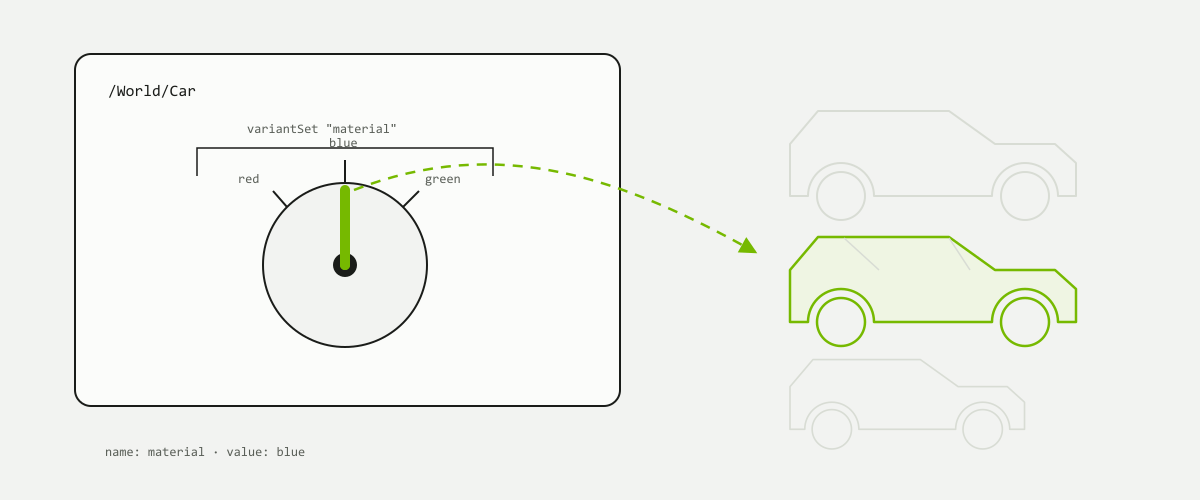
The set is the dial and its name; the variants are the positions. Three cars are described on the right and one of them is composed — which is the entire economy of the mechanism.
Question three asked which parts may change later, and not every such change needs a new file. A variant set is a named switch carried on a prim; its variants are the positions that switch can point at, and exactly one is selected at a time — so a single asset can describe every configuration it has, instead of shipping one file per configuration. A material set holding red, blue and green; an LOD set holding high and low.
The selection is itself an ordinary authored opinion, so a stronger layer can re-switch an asset it is not allowed to edit: author the selection in your own layer and the asset's file is never touched. That is also why the name of the set and the names of its variants belong on the public side of the interface — they are part of the promise, while whatever each variant composes behind them is not.
Anticipate some change with variant sets, but do not plan for every eventuality — that is bloat. Publishing a new version is the cheaper answer for a change nobody will ever want to switch between.
How an asset keeps its own dependencies straight when it moves — textures, resolvers and anchored paths — is chapter 9's subject.
Publish beside, never on top. A version you can go back to is what makes a change safe to make.
06
Mini tutorial
4 min
In brief
One messy scene, four steps, and the .usda text keeping pace with you. This is the whole chapter made clickable.
The stage on the left is a scene as somebody actually left it: a handful of prims loose at the root of the file, named for the order they happened to be created in, saved over itself an unknown number of times. Nothing about it is broken. It simply cannot be handed on. Press Next step four times and read what each one does. Create a root puts a single named prim at the top; Group parts moves the loose prims underneath it; Rename clearly gives them names a stranger can read; Version it writes the result out as _v001 rather than over the top of what was there. Reset puts the mess back.
Watch the prim paths in the text as you go. Only one step moves anything: grouping the parts is what pulls four loose objects into something recognisable. The rest leave the render alone. What changes is that the scene now has a root somebody can reference, parts somebody can address, names somebody can read, and a version somebody can go back to.
Structure is four small decisions, taken early, that decide whether anybody else can use what you made.
A scene is rarely made in one place. It passes between people, tools and stages, and every hand-off is a chance to lose something that mattered.
Think about how a single scene actually gets built. Someone models the geometry. Someone else gives it materials. A third person lays out where everything stands. A simulation runs over it, and at the end something renders it. Five people, four or five applications, and one scene they are all describing.
The awkward part has never been moving triangles. Triangles travel well. What travels badly is everything around the triangles: which parts belong together, which object is a reused copy of which other object, what a surface is made of, which of three approved colours this one is meant to be, and which of those decisions someone is still in the middle of changing.
The top lane is not wrong, it is just cumulative. Each translation is small and reasonable on its own, and by the fourth one nobody can say what the scene has stopped carrying.
Opening the file was never the hard part. Arriving with the same scene the other person was describing is the hard part.
the whole subject of this chapter
Loss is silent
Nothing warns you that the variants are gone. The geometry is there, it looks right, and the missing part is discovered by whoever needed it a week later.
Loss compounds
Each hand-off drops a little. Four hand-offs later the scene is intact as a picture and unusable as a working description.
Round trips rarely close
Sending a scene out and bringing it back is not a loop. What comes home is what the format could carry, not what you sent.
Two things the word is used for
OpeningAnother tool can read the file and put something on screen. This is the easy claim to make and the one most often meant.
PreservingThe scene arrives with its structure, its materials, its alternatives and its authorship still intact, so the next person can carry on working rather than reconstructing.
Both are called interoperability, and only the second one is worth building a pipeline on. It is also the harder one, which is why the rest of this chapter is about what gets left behind rather than about which extensions are supported.
When someone says a tool "supports" a format, they are describing a door, not a promise about what fits through it. The useful question is which parts of your scene arrive.
Interoperability is not only about opening a file. It is about preserving meaning across tools.
02
USD is not just another 3D file
3 min
In brief
Comparing USD to OBJ or glTF sounds reasonable and quietly compares two different kinds of thing. One describes a model. The other describes a scene and how a team works on it.
A model file answers one question: what shape is this, and what does its surface look like. That is a real and useful question, and formats that answer it are small, fast and everywhere. An OBJ is a bag of vertices and faces. A glTF adds materials, a node hierarchy and animation, aimed at handing a finished thing to a runtime that will display it.
USD is answering a different question. Not "what shape is this" but "what is in this scene, where did each part come from, and who is allowed to say what about it". Chapters 2 and 3 already gave you the machinery: layers that stack opinions, references that pull one asset into many places, overrides that adjust a thing locally without touching its source. None of that is geometry. All of it is the part that a model format has no place to put.
The top row is the only one the two sides share, and it is the row everybody checks. The three below it are what a pipeline is actually made of.
There is not a single vertex in this file, and it still describes a scene completely: which asset is present, where it stands, and one local opinion about its colour that leaves chair.usd untouched. Ask which lines of this an OBJ could carry, and the answer is none of them.
A model is a noun; a scene is a sentence. The chair is the noun. Where it stands, which chair it is a copy of, and who repainted it are the sentence.
Structure is content. The grouping and naming of a scene is information someone authored deliberately, and it is as losable as anything else.
The collaboration story travels too. Layers keep separate people's contributions separate, which is a thing you can only preserve if the format has somewhere to keep it.
This is why "USD versus glTF" is the wrong shape of question. They can sit in the same pipeline happily: a glTF is a reasonable thing to deliver out of a USD scene, and a poor thing to run a production in.
A model format describes an object. USD describes a scene, its structure, and how a team works on it.
03
Different formats carry different information
4 min
In brief
Formats are not interchangeable containers of the same content. Each one was designed for a purpose, kept what that purpose needed, and left out the rest deliberately.
It is tempting to picture formats as boxes of different sizes holding the same goods. They are more like vehicles built for different journeys. A format designed to hand a finished asset to a game engine has no reason to carry three unchosen material variants, so it does not, and that is not a defect. It becomes a problem only when the format is used as a pipeline's connective tissue and someone expects the unchosen variants to be waiting at the other end.
.objVery old, very widely supported, deliberately minimal. Shape, and through a companion file a simple notion of surface. Nothing about structure, variation or provenance.
.gltfDesigned for delivery to runtimes. Carries materials and a node hierarchy alongside the geometry, describing one finished configuration of a thing.
.fbxA long-standing exchange format between authoring applications. Carries a good deal, including rigs and animation, and is still a hand-off rather than a shared description.
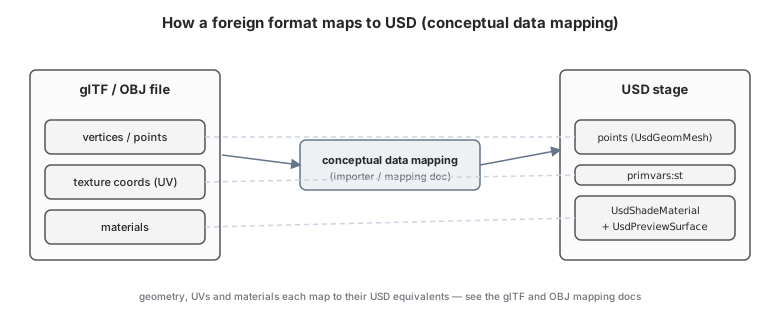
USD can read from these. Omniverse applications ship an Asset Importer for common art formats, with a separate CAD Converter for engineering formats, and the wider ecosystem of importers, exporters and converters is catalogued elsewhere. That list is the easy part to look up and the least interesting thing to know. What is worth carrying away is that an import is a decision, made by someone, about which parts of the source become which parts of a USD scene — and about what has nowhere to go.
Nothing here has gone wrong. Each step did exactly what it was designed to do, and the shape of the container in the middle decided what survived the journey.
Geometry is the easy half
Points, faces and texture coordinates cross almost any boundary. If a hand-off is going to disappoint you, it will not be here.
Materials are the hard half
Describing what a surface means to a renderer is the hardest thing to carry between tools, because tools disagree about it more than about anything else. Expect to re-author materials at the far end of any move.
Structure is the forgotten half
Grouping, reuse and variation are usually not even considered when a format is judged, and they are what a pipeline actually runs on.
Where the translation happens
Usually a converter runs ahead of time and leaves a USD file behind, which is convenient: the result is something you can open, inspect, version and hand to someone else. USD also allows the other arrangement, where a plug-in makes a foreign file readable as USD at the moment the stage opens, with nothing written to disk. Either way a translation is happening and somebody chose what it keeps — the difference is only whether you can see the result afterwards.
Ask what the format was built for. Delivery, exchange between authoring tools, or archival. The answer predicts what it keeps better than any feature list does.
Ask what this hand-off needs. A shape going to a 3D printer needs almost nothing else. A scene going back into production needs nearly everything.
Assume the difference is silent. Nothing in the file records what the previous step declined to write down.
Do not read this as a ranking. A format is only badly chosen relative to a job. The question is never which format is best, it is what this particular hand-off needs to arrive intact.
Every format keeps what it was designed to keep. Choose one by what has to survive the trip, not by what opens.
04
Mapping: what survives when data moves
3 min
In brief
Two tools can hold the same idea under different names. A mapping is the agreement about which idea in one tool becomes which idea in the other, and which ones have nowhere to land.
Much of the friction between tools is not disagreement about what a scene contains. It is vocabulary. One application calls a container of other objects a group. Another calls it a collection. A third calls it a null, or a locator. USD calls it an Xform. The same idea, wearing four names, and a conversion is largely a matter of recognising it each time it appears.
Agreeing the vocabulary is most of the work. Once both sides name the same idea the same way, the conversion stops being a negotiation and becomes a lookup.
Writing that alignment down before anyone builds a converter is what turns a vague hope into something you can check. It is an ordinary document: a row for each concept in the source, the USD concept it becomes, and a note where it becomes nothing. The blank rows are the valuable ones, because a gap that is written down can be discussed, and a gap that is silent is discovered by whoever it hurts.
Underneath every importer, exporter and converter is a decision like this one: which concept in the source becomes which concept in USD, and which one is quietly left behind.
It makes disagreement visible early. Two people who thought they agreed usually find out at the document, which is far cheaper than finding out at the deadline.
It says what is actually supported rather than what someone hoped would cross.
A blank row is a request. A concept with nowhere to land is a candidate for something new in USD, and the community has used it that way.
It keeps moving
Both sides change. The source format gets a new version, USD gets a new release, and an agreement nobody has revisited slowly stops describing what the tools do.
The misses count
List the concepts that do not cross as well as the ones that do. An omission that is written down is a known limitation; an omission that is not is a surprise.
Favour the plain reading
A mapping that lands close to the source's own shape is easier to check than a clever one. Reorganising to house style is a separate step, done afterwards.
You are unlikely to write one of these on a first pass. Knowing they exist is enough — it explains why two tools that both claim to support USD can still hand you different results from the same file.
Conversion is not magic, it is an agreement about names. What survives is exactly what both sides agreed to recognise.
05
Mini tutorial
4 min
In brief
One small model, three routes out of the building. Everything this chapter has argued, made clickable: pick a format and watch what the model arrives as.
The three buttons choose a route: OBJ, glTF, or USD. The card in the middle keeps score of what that route carries — geometry, materials, hierarchy, variants, references and layers, and whether two people can still work on the scene together — from nothing, through partial, to intact. The viewport on the right shows the consequence: the same small model as it survives each trip.
Watch the rows fill in from the top down. Geometry is present on every route, which is exactly why an OBJ looks fine at first glance and why the loss is so easy to miss. What separates the three routes is everything below that first row: whether the surface still knows what it is made of, whether the parts still know they belong together, whether the alternatives are still there to choose from, and whether anyone else can contribute to the scene without asking you to export it again.
The picture arriving intact is not the same as the scene arriving intact. USD is the route where the rows below the geometry are still filled in.
Prims, layers, references, payloads, structure, interchange. Five chapters of words — here are real files to go and find them in.
Everything below is a free scene you can download and take apart. Start with a small one. A 25 MB template opens in seconds and shows you the shape of a stage; a 9 GB showcase downloads for half an hour and then stutters in your viewport. The big packs are worth the disk space, second.
What the catalogue holds
3D assetsUSD models, including the default scene templates pack
MaterialsMDL material packs
Environmentsskies and surroundings
Workflow samplespacks built around a specific workflow
All of it lives on one NVIDIA page, free to download and free to use in your own work.
250+ GBmodels, materials and environments in the full catalogue
1 zipper pack, straight from the browser
No accountnothing to sign up for, nothing to install first
That page is reorganised from time to time. If a name below has moved, search
the page for the name rather than hunting for an old link — the names are the stable part.
All six packs, and where each one comes from
Smallest first. Every pack here is NVIDIA's, hosted and served by
NVIDIA — each row opens
their asset-pack page, where the
pack is described and downloaded with their own button.
Pack
Download size
Where to get it
AEC XR Assets Packdesign-tool source files beside the stage they became
Two of these sizes disagree with the figures printed on NVIDIA's
page, and the file is the one that wins: Showcase Scenes is listed there as 2.3 GB but the
archive is 9.19 GB, and USD Explorer is listed as 508 MB but is 549 MB.
Check the bottom two rows against your connection before you start either one.
The one failure mode to know first
This is the one failure mode worth knowing before you start downloading. A pack with an unmet dependency does not refuse to open, so the symptom you actually see is untextured geometry.
Download as zip archives from the button beneath each pack. Some are several gigabytes.
Watch for dependencies some packs depend on others, and those are identified where applicable.
Read the dependency line first. It costs a moment before a large download and saves an hour of hunting a shading bug that is not one.
Watch your disk. Large packs consume space quickly once unzipped.
Grey, flat, matte geometry where you expected wood and metal is almost never a renderer problem. It is a resolver problem: something referenced is not where the scene says it is. Chapter 3's arcs are what dangled.
Open one real scene and the vocabulary of the last four chapters stops being vocabulary.
02
Large scenes: collaborative and finished worlds
3 min
In brief
Two visually striking, real-world scenes. These are the ones that show what a finished OpenUSD world looks like — and they are the two largest downloads on the page.
These suit a reader who has a fast connection, spare disk space and a machine that can render. They reward reading rather than editing: open them, walk the hierarchy, and see how many separate files a single polished frame is actually made of.
Restaurant Demo Assets Pack3.97 GB
What it showsA shared OpenUSD world for collaborative design. Different assembly files from DCC tools are inserted into one primary composition.
What to look forHow cameras, animations, section tools, sun study, white-model mode, assembly files and world files support a live design workflow.
The restaurant pack is the clearer lesson of the two, because of one split it makes visible.
The same split chapter 3 drew between an asset and the scene that
references it — holding up across a whole restaurant, contributed to by several tools.
Open the tree before the viewport in a scene this size the hierarchy tells you more in a minute than the render does in ten.
Find the world file and read what it references. It is usually short, and it is the map of everything else.
Look at what is not geometry cameras, lights, section tools and sun studies are prims like any other, and they are where the workflow lives.
Note which tool each part came from. A collaborative scene is several applications' output standing in one stage without arguing.
Neither of these is a first scene. Downloading nine gigabytes before you have opened a stage tree is a way of spending an evening without learning anything. Section 03 is where to start.
Large scenes are for reading, not for editing. Open them to see how many files a finished world is.
03
Small scenes: start here
3 min
In brief
Two lightweight starting points, both small enough to download over lunch and open on an ordinary machine. If you take one thing from this page, take one of these.
These suit a reader who wants to be inside a real stage today rather than tomorrow. They are small because they contain structure and almost nothing else — which is exactly what makes them readable. Open one in usdview, covered in chapter 7, and the whole file fits in the tree panel without scrolling.
Default Scene Templates Pack25 MB
What it showsTen small drag-and-drop OpenUSD template scenes.
What to look forThe minimum structure of a usable stage — environment, camera, light, render setup and scene root.
A scene root, somewhere for the environment, a camera, and an empty container waiting for whatever you drag in. Nothing here is clever, and that is the point — this is the part every scene on this page has, under the part that makes it interesting.
Why the empty container matters
The templates are drag-and-drop because they leave a named, empty place for content to arrive. A stage that has decided where things go is a stage other people can add to without negotiating.
That is chapter 4's argument in its smallest possible form. Compare two templates and the structural parts are the ones that repeat.
The AEC pack is smaller still, and interesting for the opposite reason: much of it is not USD at all.
SketchUpwhere the massing was drawn
Rhinowhere the surfaces were resolved
Grasshopperthe definitions that generated them
.usd stagewhat all three arrived as, ready to be viewed together
Chapter 5's interchange story with the receipts still in the box.
Twenty-five megabytes of template scenes will teach you more in an hour than nine gigabytes of showcase will.
04
Industrial and city-scale scenes
3 min
In brief
Two scenes built by aggregation rather than by modelling: a factory assembled from CAD, and a city generated from urban-planning data.
These suit a reader whose interest is simulation, planning or robotics rather than rendering. Both are mid-sized downloads, and both are interesting less for what they look like than for how they are organised — neither was made by one person building one file.
USD Explorer Sample Assets Pack549 MB
What it showsA sample OpenUSD factory model for learning how CAD data can be aggregated into Omniverse and USD Explorer.
What to look forHow industrial assets are organised into a factory-planning scene.
Scenes at this scale are where payloads stop being a theory.
A city and a factory are both far larger than any viewport needs at
once. Open the city and watch what loads: that is the reference-versus-payload distinction
from chapter 3, at the only scale where you can feel it.
A modelled scene
Authored for how it looks from a camera.
Detail concentrated where the shot is.
The hierarchy serves the artist who built it.
An aggregated scene
Assembled from data another system already held.
Detail uniform, because nothing chose a viewpoint.
The hierarchy carries the source system's own logic.
Neither column is the better way to build. They are answers to different questions, and both scenes in this row are the second kind — which is why their trees look like inventories rather than like compositions.
Aggregated scenes are also where naming quality shows. A factory whose prims are called Part_0043 and a factory whose prims carry the names the CAD system gave them are the same geometry and two entirely different experiences to work in.
A factory and a city are not big models. They are many small models, arranged.
05
Try a simplified template scene in the Sandbox
2 min
In brief
Before downloading large asset packs, start with a small scene. Nothing on this page is faster to reach than the one already in this tab.
Do a thing, read the line it wrote. That loop is the whole method, and here it costs nothing.
Move an object
Drag a prim in the viewport and watch xformOp:translate rewrite itself in the text.
Mute a layer
Switch off the strongest opinion and watch a weaker one take over the value.
Read who won
Every property names the layer that set it. That is the question, in every scene above.
Layers and strength ordering. def and over specs. Opinion resolution, muting, deactivation.
It leaves out
References, payloads, variants and time samples — deliberately. It will not open any pack above.
It is not
A USD runtime, or a substitute for usdview — for that, open a downloaded scene in usdview or Composer itself.
What it does give you is the reading habit: not what is this value, but
which file said so.
Change one thing and read what it wrote. That is the whole method, and it works at 25 MB and at 9 GB alike.
06
Next step: choose one scene
2 min
In brief
Six packs is five too many to start with. Pick one, open it, and put the same five questions to it.
The point of a directory page is that you leave it. Choose one scene — the templates pack if you have no reason to prefer another — take it from NVIDIA's asset-pack catalogue, open it, and ask:
What is the main stage?
What assets are referenced into the scene?
Where are cameras, lights and materials defined?
Which part of this scene would you change first?
If you built your own OpenUSD world, would it be a room, a city, a factory or a character scene?
Questions 1–3 · the file answers these
All three are visible in a tree panel in about ten minutes. No opinion required.
Questions 4–5 · only you answer these
The first sign that a scene has stopped being a specimen and started being something you have opinions about.
Question five is the one this book has been walking towards
Every chapter so far described what other people built. This one asks what you would build.
A rooma lobby, a house, an interior somebody walks through
A factorya line, a cell, a plant that has to match a real one
A machinesomething that moves, and has to move correctly
A character scenea shot, a set, a story with a camera in it
The answer decides which of the later chapters matter most to you, and nobody
but you can give it.
One scene, five questions, and an answer to the fifth that is yours rather than the book's.